Usage
This page shows how to work with GraphCoreSGHDBSCAN in practice after the
package is installed.
The package supports two main workflows:
build a similarity graph from feature data and cluster from that graph
provide a graph or adjacency representation directly in
precomputedmode
For most users, GraphCoreSGHDBSCAN is the main entry point.
Basic workflow
A typical workflow is:
prepare a feature matrix
Xor a precomputed graphcreate a
GraphCoreSGHDBSCANmodelcall
fit(...)orfit_predict(...)inspect labels
inspect the condensed tree
compare several
min_samplesvalues if needed
Minimal example
The simplest usage pattern is:
from coresg_graphhdbscan import GraphCoreSGHDBSCAN

model = GraphCoreSGHDBSCAN()
labels = model.fit_predict(X)
This uses the default configuration:
min_samples=10sim_graph_method="sc_umap"metric="euclidean"metric_kwds=Noneadd_neighbor=Trueno_noise=Truen_neighbors=15heuristic_connect=Falsemin_cluster_size=None
fit vs. fit_predict
Use fit_predict(X) when you want labels immediately for a single requested
configuration.
model = GraphCoreSGHDBSCAN(min_samples=10)
labels = model.fit_predict(X)
Use fit(X) when you want to inspect the fitted object, view the hierarchy,
or retrieve results for several min_samples values later.
model = GraphCoreSGHDBSCAN(min_samples=10)
model.fit(X)
Single min_samples value
If you want one clustering solution only, pass a single integer:
model = GraphCoreSGHDBSCAN(min_samples=10)
labels = model.fit_predict(X)
This is the simplest and most common starting point.
Multiple min_samples values in one run
One of the package’s main strengths is the ability to fit several
min_samples values in one model run.
from coresg_graphhdbscan import GraphCoreSGHDBSCAN

model = GraphCoreSGHDBSCAN(min_samples=[5, 10, 15])
model.fit(X)

labels_5 = model.labels_for(5)
labels_10 = model.labels_for(10)
labels_15 = model.labels_for(15)
This is useful when you want to compare clustering behavior across several density settings without rebuilding the full workflow from scratch.
You can also use ranges:
model = GraphCoreSGHDBSCAN(min_samples=range(2, 10))
model.fit(X)
Inspecting the hierarchy
After fitting, you can inspect the hierarchical structure through the condensed tree.
Static condensed tree
The most reliable visualization method is the static condensed tree:
model.fit(X)
model.plot_condensed_tree(10)
If you fit several min_samples values, pass the specific value you want to
inspect.
Interactive condensed tree
For live notebook work, the package also provides an interactive condensed tree:
widget = model.interactive_condensed_tree()
widget
This view lets you change min_samples interactively and inspect the
corresponding condensed tree without refitting the model. It is useful when you
fit several min_samples values in one run and want to compare the resulting
hierarchies visually.
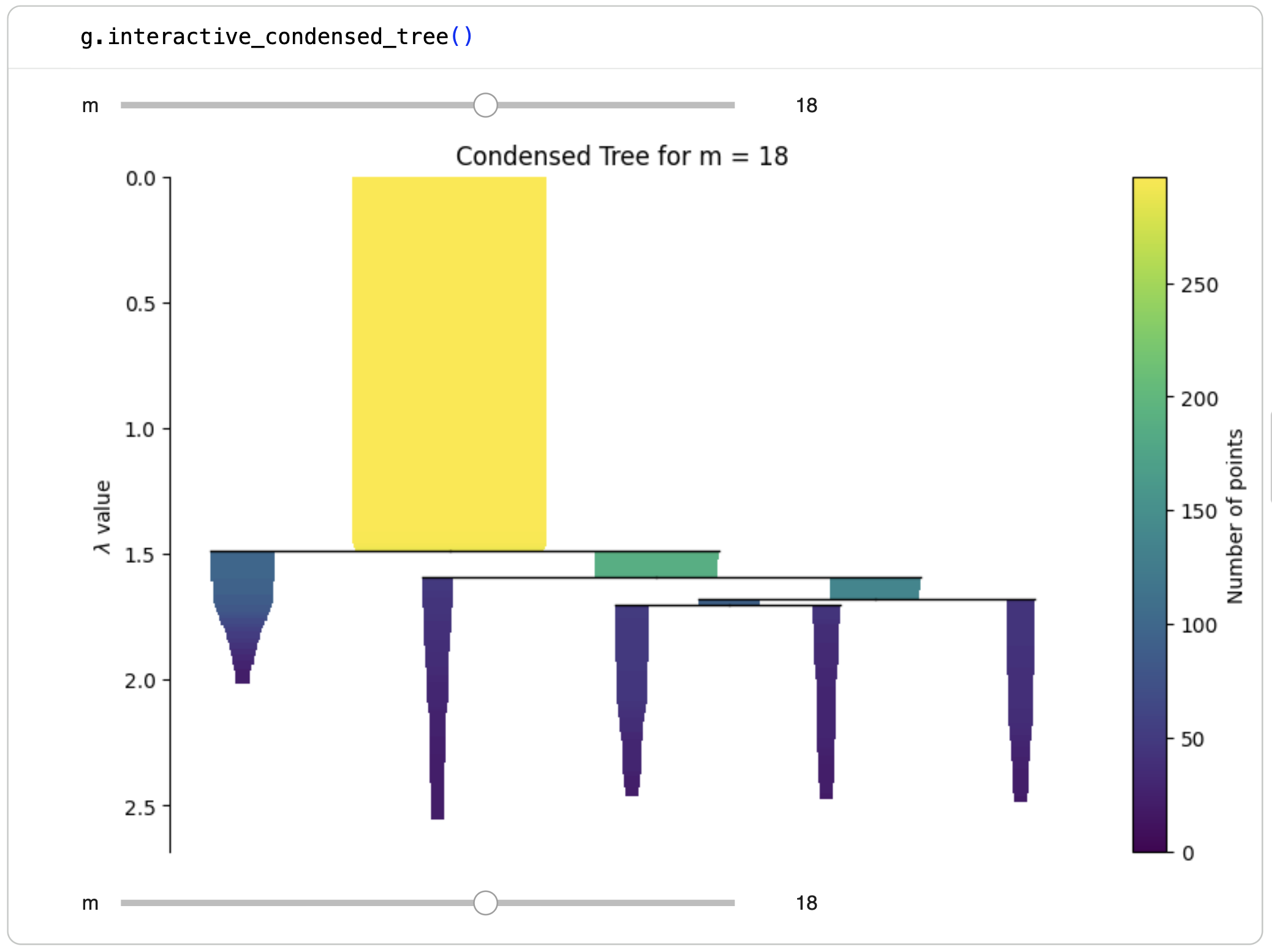
In this interface, the slider controls the selected value of min_samples.
As the selected value changes, the displayed condensed tree updates so that you
can compare hierarchical structure across different density settings.
A typical workflow is:
model = GraphCoreSGHDBSCAN(min_samples=range(2, 20))
model.fit(X)

widget = model.interactive_condensed_tree()
widget
This feature is most useful in a live Jupyter environment.
Choosing a graph-construction backend
The package supports several graph-construction backends through
sim_graph_method.
Default UMAP-style graph
model = GraphCoreSGHDBSCAN(
    sim_graph_method="sc_umap",
    n_neighbors=15,
)
model.fit(X)
This is the default and a good starting point for many datasets.
Gaussian connectivity graph
model = GraphCoreSGHDBSCAN(
    sim_graph_method="sc_gauss",
    n_neighbors=15,
)
model.fit(X)
This uses Scanpy’s Gaussian connectivity routine.
PhenoGraph-style graph
model = GraphCoreSGHDBSCAN(
    sim_graph_method="jaccard_phenograph",
    n_neighbors=15,
)
model.fit(X)
This uses a PhenoGraph-style graph construction.
Using different distance metrics
The metric parameter controls the distance measure used during
similarity graph construction.
The default is:
model = GraphCoreSGHDBSCAN(
    sim_graph_method="sc_umap",
    metric="euclidean",
)

model.fit(X)
Other supported distance metrics include:
"cityblock""cosine""euclidean""l1""l2""manhattan""braycurtis""canberra""chebyshev""correlation""dice""hamming""jaccard""mahalanobis""minkowski""rogerstanimoto""russellrao""seuclidean""sokalmichener""sokalsneath""sqeuclidean""yule""hybrid_euclidean_cosine"
Cosine distance
model = GraphCoreSGHDBSCAN(
    sim_graph_method="sc_gauss",
    metric="cosine",
)

model.fit(X)
Correlation distance
model = GraphCoreSGHDBSCAN(
    sim_graph_method="sc_umap",
    metric="correlation",
)

model.fit(X)
Minkowski distance with metric_kwds
Some metrics require additional keyword arguments. These can be passed
through metric_kwds.
model = GraphCoreSGHDBSCAN(
    sim_graph_method="sc_umap",
    metric="minkowski",
    metric_kwds={"p": 1.5},
)

model.fit(X)
Mahalanobis distance
For Mahalanobis distance, pass the inverse covariance matrix VI:
import numpy as np

VI = np.linalg.pinv(np.cov(X, rowvar=False))

model = GraphCoreSGHDBSCAN(
    sim_graph_method="sc_umap",
    metric="mahalanobis",
    metric_kwds={"VI": VI},
)

model.fit(X)
Standardized Euclidean distance
For standardized Euclidean distance, pass the variance vector V:
import numpy as np

V = np.var(X, axis=0, ddof=1)

model = GraphCoreSGHDBSCAN(
    sim_graph_method="sc_umap",
    metric="seuclidean",
    metric_kwds={"V": V},
)

model.fit(X)
Hybrid Euclidean-cosine mode
model = GraphCoreSGHDBSCAN(
    sim_graph_method="sc_umap",
    metric="hybrid_euclidean_cosine",
)

model.fit(X)
In this mode, full distances remain Euclidean while neighborhood graph construction uses cosine geometry.
Unsupported metric and combination
The metric "kulsinski" is not supported because it is not available
in current versions of scikit-learn’s pairwise_distances.
The following combination is intentionally not supported:
GraphCoreSGHDBSCAN(
    sim_graph_method="sc_gauss",
    metric="yule",
)
This combination can produce non-finite graph weights. Use
metric="yule" with sim_graph_method="sc_umap" or
sim_graph_method="jaccard_phenograph" instead.
Using precomputed graphs
If you already have a graph or adjacency representation, use
sim_graph_method="precomputed".
model = GraphCoreSGHDBSCAN(
    min_samples=10,
    sim_graph_method="precomputed",
    no_noise=True,
)
model.fit(my_graph)
In precomputed mode, the input to fit(...) may be:
a
networkx.Grapha SciPy sparse adjacency matrix
a square dense adjacency matrix
This mode is useful when the graph is already part of the experimental design or has been built by another method.
Connectivity handling
The final graph used by clustering must be connected.
Default behavior
With heuristic_connect=False, disconnected components are connected using a
simple fallback that adds synthetic bridge edges.
model = GraphCoreSGHDBSCAN(
    heuristic_connect=False,
)
Heuristic connectivity
With heuristic_connect=True, the package increases n_neighbors until
the graph becomes connected.
model = GraphCoreSGHDBSCAN(
    heuristic_connect=True,
    n_neighbors=15,
)
During fitting, the package may report messages such as:
Trying n_neighbors = 16
Trying n_neighbors = 17
Noise reassignment
With no_noise=True, points initially labeled -1 are reassigned by an
MST-based propagation step after clustering.
model = GraphCoreSGHDBSCAN(
    no_noise=True,
)
If you want to preserve the original HDBSCAN*-style noise labels, disable it:
model = GraphCoreSGHDBSCAN(
    no_noise=False,
)
Useful outputs after fitting
After fitting, users commonly inspect:
model.coresg_for the internal CoreSG objectmodel.similarity_graph_for the initial similarity graphmodel.similarity_graph_WSSfor the weighted structural similarity graphmodel.dissimilarity_graph_for the graph after similarity-to-dissimilarity conversionmodel.connected_graph_for the final connected graphmodel.dist_matrix_for the dense matrix used by CoreSGHDBSCAN
If you fit multiple min_samples values, retrieve a selected solution with:
labels = model.labels_for(10)
For lower-level access, labels are also stored inside the internal model
objects associated with each fitted min_samples value.
Common usage patterns
Default configuration
from coresg_graphhdbscan import GraphCoreSGHDBSCAN

model = GraphCoreSGHDBSCAN()
labels = model.fit_predict(X)
Explore several density settings
model = GraphCoreSGHDBSCAN(
    min_samples=range(2, 20),
    sim_graph_method="sc_gauss",
    n_neighbors=16,
    no_noise=True,
    metric="euclidean",
    heuristic_connect=True,
)

model.fit(X)
model.plot_condensed_tree(4)
labels_18 = model.labels_for(18)
Cosine-based graph construction
model = GraphCoreSGHDBSCAN(
    min_samples=[5, 10],
    sim_graph_method="sc_gauss",
    metric="cosine",
    n_neighbors=20,
)
model.fit(X)
labels_10 = model.labels_for(10)
Precomputed graph workflow
model = GraphCoreSGHDBSCAN(
    min_samples=10,
    sim_graph_method="precomputed",
    no_noise=True,
)
model.fit(my_graph)
model.plot_condensed_tree(10)
Working with fitted results
After calling fit(), the package stores results for each fitted
min_samples value.
g = GraphCoreSGHDBSCAN(
    min_samples=range(2, 20),
    sim_graph_method="sc_gauss",
    metric="euclidean",
    n_neighbors=16,
    no_noise=True,
    save_models=True,
)
g.fit(X)
Stored labels
labels_5 = g.labels_by_m_[5]
You can also use:
labels_5 = g.labels_for(5)
Note that labels_for(m) may apply noise reassignment depending on
the no_noise setting, while labels_by_m_[m] is the directly
stored fitted result.
Stored condensed trees
tree_5 = g.condensed_trees_[5]
Plot a selected condensed tree:
g.plot_condensed_tree(5)
Interactive condensed tree browser:
g.interactive_condensed_tree()
Stored models
If save_models=True, full per-m models are available:
model_5 = g.models_[5]
Practical notes
min_samplesis the main clustering hyperparameter and is often the first thing to tune.min_cluster_size=Nonemeans that the package follows the selectedmin_samplesvalue for each run.plot_condensed_tree(...)is the most reliable visualization for static documentation and reports.interactive_condensed_tree()is best suited for live notebooks.Some graph builders depend on optional packages and will raise an import error if those packages are not installed.
Notebook tip
In notebook environments, use a trailing semicolon to suppress the display of the fitted object representation:
g.fit(X);